QA Process
How QA fits Into the Global Delivery Framework
In Akvo’s Global Delivery Framework (GDF), Quality Assurance (QA) plays a structured and strategic role, particularly within the project implementation and software development phases. QA is not a separate or standalone step, but an integrated part of the project lifecycle, aimed at ensuring high-quality delivery and partner satisfaction.
Integration With GDF Tools and Processes
QA work supports the Project Dashboard and PRO (Project Report Out) submissions:
-
QA status updates feed into the project traffic light system (Green, Yellow, Red).
-
QA outcomes affect decisions related to scope, timeline, and budget adjustments.
QA in the GDF ensures that Akvo’s project delivery is:
-
Structured - Embedded early in the project life cycle through test planning and documentation.
-
Collaborative - Works closely with TPMs, Project Managers, and Dev teams.
-
Measured - QA outcomes directly inform PRO submissions and project status.
-
Quality-driven - Ensures deliverables meet defined standards before reaching the client
This systematic QA integration helps Akvo achieve its core GDF objectives:
-
Increased project quality and partner satisfaction
-
Improved internal operational efficiency
Scope of the QA Role
The QA will focus on functional testing to ensure that features work as intended. At the initial stage, the focus will be on manual testing using TestLodge to support testing.
The goal of this will be to:
-
Standardize testing practices to maintain consistency across projects.
-
Improving functional test coverage across various projects and use cases.
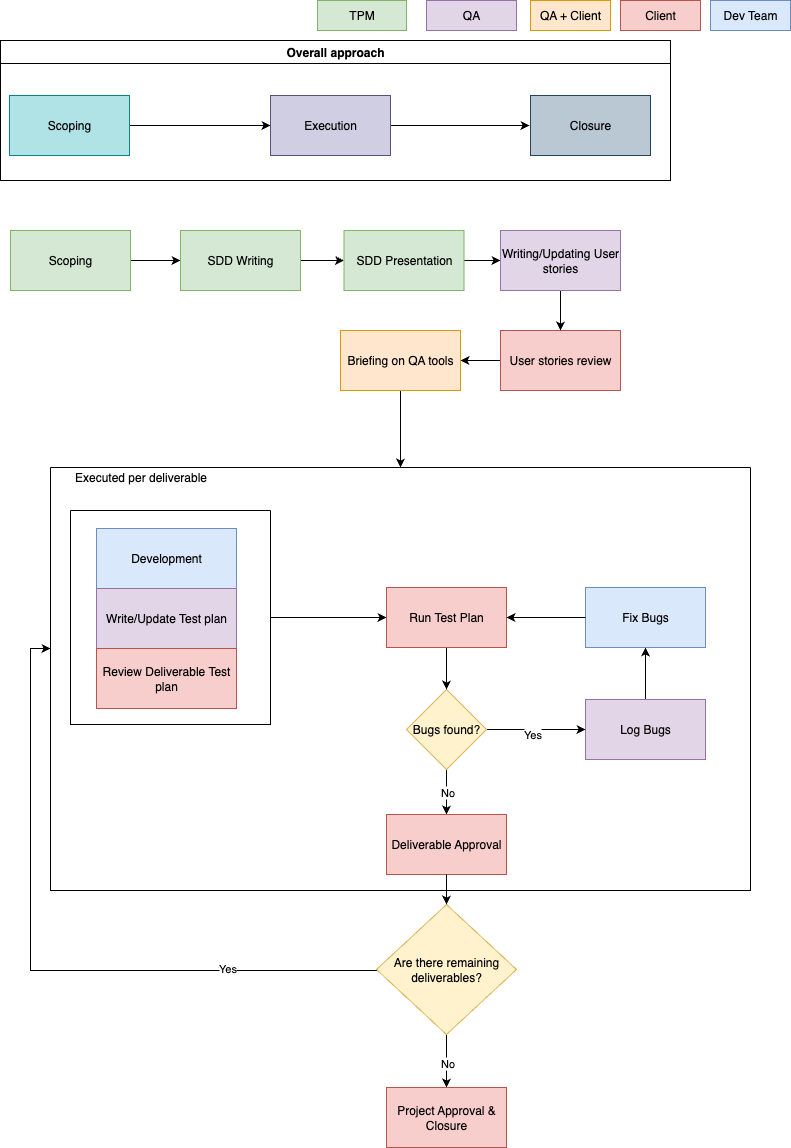
Scoping
Defines the boundaries, objectives, and priorities of the project. The output from this step (scoping notes or high-level technical outline) clarify what will be developed.
SDD Writing
The TPM creates a System Design Document (SDD) that outlines what needs to be built, detailing technical aspects, feature requirements, and dependencies. For QA, it acts as a foundational reference that clarifies how different user stories relate to the overall system, helping ensure consistency and coverage during testing.
SDD Presentation
The team reviews the SDD together. This is a chance to ask questions, flag missing info, and ensure there's a shared understanding of the approach. The QA uses this to begin designing test cases.
Writing/Updating User Stories
QA uses the SDD to shape or refine user stories, making sure they reflect the latest understanding of the feature. If some stories already exist, they’re updated to align with any new details or decisions.
User Stories Review
The QA team, TPM and the client go through each user story to ensure it's clear, complete, and meets the requirements. This is also where edge cases and test scenarios begin to emerge.
Briefing on QA Tools
QA gives the client a quick walkthrough of the tools (Testlodge in this case) like where to find test cases, how bugs will be logged, and how everyone will stay in sync during testing.
Per Deliverable Execution
Development
The development team begins building the feature or component. This includes writing code, reviewing it internally, and getting everything ready for testing.
Write or Update Test Plan
As the feature takes shape, QA prepares a test plan tailored to that specific deliverable. It spells out what will be tested, how it will be tested, and what outcomes are expected. This ensures nothing important is missed.
Review Deliverable Test Plan
Before testing begins, the test plan is reviewed by the TPM, client and QA team. This step helps confirm that all relevant scenarios are covered and that the test plan matches the deliverable's scope.
Run Test Plan
QA runs through each test case to confirm everything works as expected and to catch any issues early. The client also reviews the deliverable either on their own or together with QA using the test cases as a guide. This collaborative approach helps ensure the feature meets expectations from both technical and user perspectives. Any bugs or feedback are documented and sent to the development team. If everything passes, the deliverable moves on to approval.
Log Bugs
When issues come up during testing, QA logs them in Asana complete with clear steps to reproduce, screenshots (if needed), and an assessment of how serious each bug is.
Fix Bugs
Developers then work on fixing the reported issues. Once fixes are in place, they let QA know so retesting can begin. This back-and-forth may happen a few times until everything checks out.
Deliverable Approval
Once testing is complete and all issues are resolved, the deliverable goes through a final review and is formally approved by the TPM and the client. If there are more deliverables in the pipeline, the process starts again with the next one.
Project Approval & Closure
When all deliverables have been completed and approved, the project moves into its final stage. A final sign-off is done, and all stakeholders are informed that the project is officially closed.
Responsibilities
|
Task |
TPM |
PM |
QA Team |
Dev Team |
|
Drive scoping |
R |
A |
I |
I |
|
Write and present SDD |
A |
R |
I |
I |
|
Review and finalise SDD |
R |
A |
I |
I |
|
Write, execute, and update test cases |
I |
I |
A/R |
C |
|
Provide final QA sign-off |
I |
I |
A/R |
C |
|
Develop features |
A |
C |
C |
R |
|
Fix defects based on QA feedback |
A |
I |
C |
R |
A - Accountable R - Responsible C - Consulted I - Informed
QA Onboarding process
For a QA specialist to integrate effectively into a project, the following steps should be taken:
-
Review Design Documentation - Gain an understanding of the project scope, objectives, and user requirements by reading design documents.
-
Examine UI/UX Designs - Study wireframes and prototypes to understand the user flows and interface expectations.
-
Engage with Developers - Ask clarifying questions about functionality, edge cases, and system constraints.
-
Receive QA Task Assignments - Developers/TPM/PM will delegate specific QA tasks that require manual verification and testing.
Tooling
TestLodge is a user-friendly, cloud-based test management tool used to support manual quality assurance (QA) processes. It allows teams to create, manage, and execute test cases.
TestLodge is primarily used for the following:
-
Writing and organizing test cases based on project requirements and features.
-
Executing test runs during development sprints and UAT (User Acceptance Testing) phases.
-
Collaborating with clients, who can be granted access to view or contribute to test progress and outcomes.
-
Logging and tracking issues by integrating with Asana.
Using TestLodge ensures transparency, traceability, and structured QA practices, while making it easy for both internal teams and clients to stay aligned on testing progress and feedback.
(Record a 3 minute video walk-through for PMs)
Collaboration Between QA, PM, and Dev Teams
Effective QA reporting at Akvo depends on close collaboration between the QA, Project Management (PM), and Development teams. QA specialists share regular updates on test progress, bugs, and blockers through test reports generated in TestLodge. These reports are linked directly to related Asana tasks, making it easy for the team to track what needs attention. Each issue includes clear steps to reproduce, relevant screenshots, and any context that helps speed up resolution. PMs use this information to adjust timelines and communicate with clients, while developers rely on QA input to prioritize bug fixes and enhance feature stability. The use of shared tools like Asana, TestLodge, and Slack ensures real-time visibility, efficient task tracking, and quicker resolution of issues. This helps maintain product quality while ensuring alignment on delivery goals.
Best practices and lessons learnt
Key best practices include:
-
Writing clear, reusable, and traceable test cases.
-
Starting QA planning early in the project lifecycle.
-
Testing incrementally, in parallel with development.
-
Documenting bugs with precise reproduction steps and screenshots.
-
Involving PMs and clients in UAT preparation and execution.
Project Retrospectives
Akvo encourages a culture of continuous improvement by integrating feedback at every stage of the QA cycle. After each project, retrospectives are held to reflect on what went well, what didn't, and how testing processes can be improved. Client feedback gathered during UAT or post-deployment is also reviewed to identify missed edge cases or usability concerns. This information can then be used to refine and improve QA workflows.