# Low Level Design

## Validation Development

### Basic Plot Validations

#### XLSForm

<table border="1" id="bkmrk-field-value-descript" style="border-collapse: collapse; width: 100%; height: 225.4px;"><colgroup><col style="width: 17.4136%;"></col><col style="width: 56.8415%;"></col><col style="width: 25.7449%;"></col></colgroup><thead><tr style="height: 29.8px;"><td style="height: 29.8px;">Field</td><td style="height: 29.8px;">Value</td><td style="height: 29.8px;">Description</td></tr></thead><tbody><tr style="height: 29.8px;"><td style="height: 29.8px;">type</td><td style="height: 29.8px;">text</td><td style="height: 29.8px;">  
</td></tr><tr style="height: 29.8px;"><td style="height: 29.8px;">name</td><td style="height: 29.8px;">validate\_polygon</td><td style="height: 29.8px;">  
</td></tr><tr style="height: 29.8px;"><td style="height: 29.8px;">required</td><td style="height: 29.8px;">true</td><td style="height: 29.8px;">  
</td></tr><tr style="height: 46.6px;"><td style="height: 46.6px;">appearance</td><td style="height: 46.6px;">ex:org.akvo.afribamodkvalidator.VALIDATE\_POLYGON(shape=${target\_field})</td><td style="height: 46.6px;">  
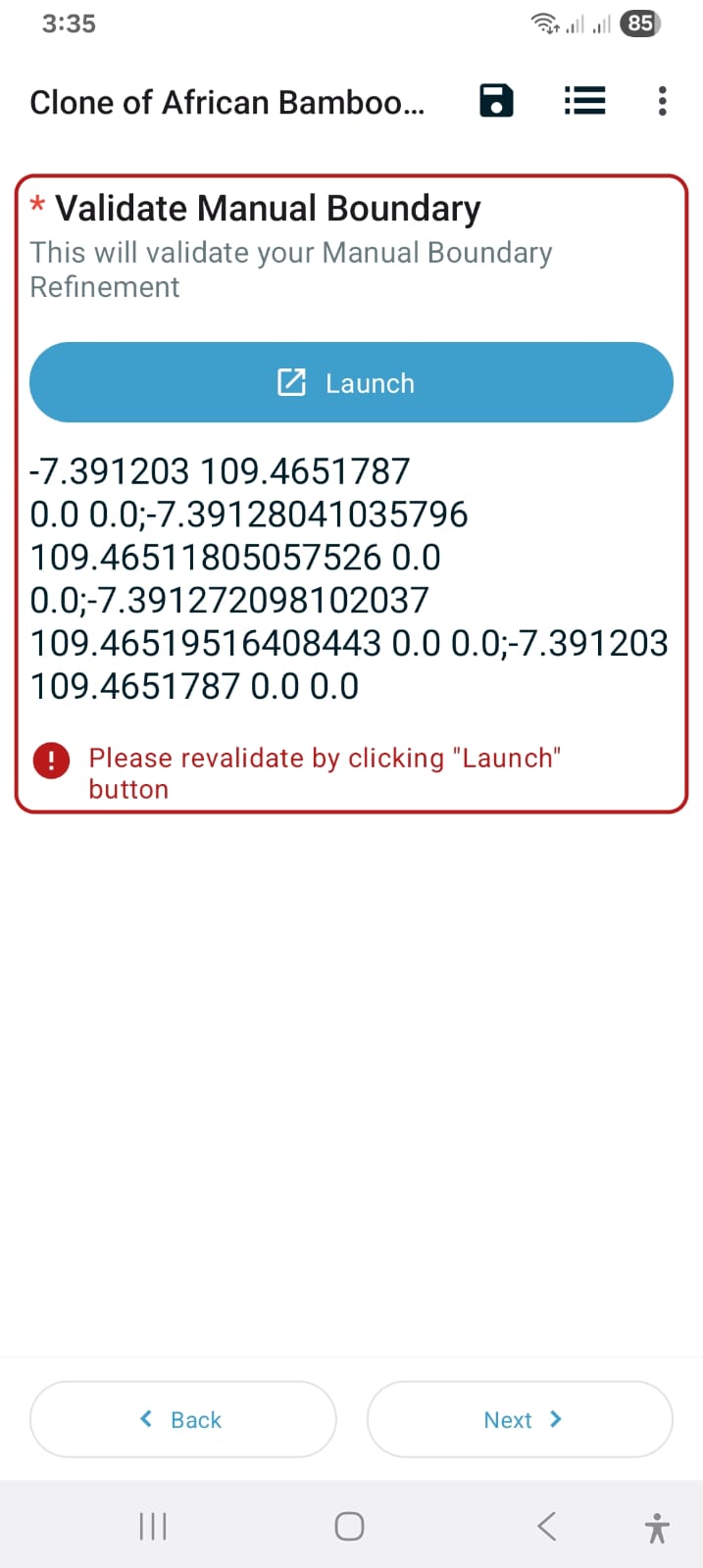
</td></tr><tr style="height: 29.8px;"><td style="height: 29.8px;">constraint</td><td style="height: 29.8px;">. = ${manual\_boundary}</td><td style="height: 29.8px;">  
</td></tr><tr style="height: 29.8px;"><td style="height: 29.8px;">constraint\_message</td><td style="height: 29.8px;">Please revalidate by clicking "Launch" button</td><td style="height: 29.8px;">  
</td></tr></tbody></table>

Full source: [Spreadsheet - African Bamboo B.V. Parcel Boundary Mapping](https://docs.google.com/spreadsheets/d/1cBWM45x6LZoxMZMFmGL0a2reTMLT8Ese5LhkTSI4QBo/edit?usp=sharing)


#### Geometry Validation Logic and Response

The following describes various validation scenarios and error messages related to plot/boundary recording in forms:

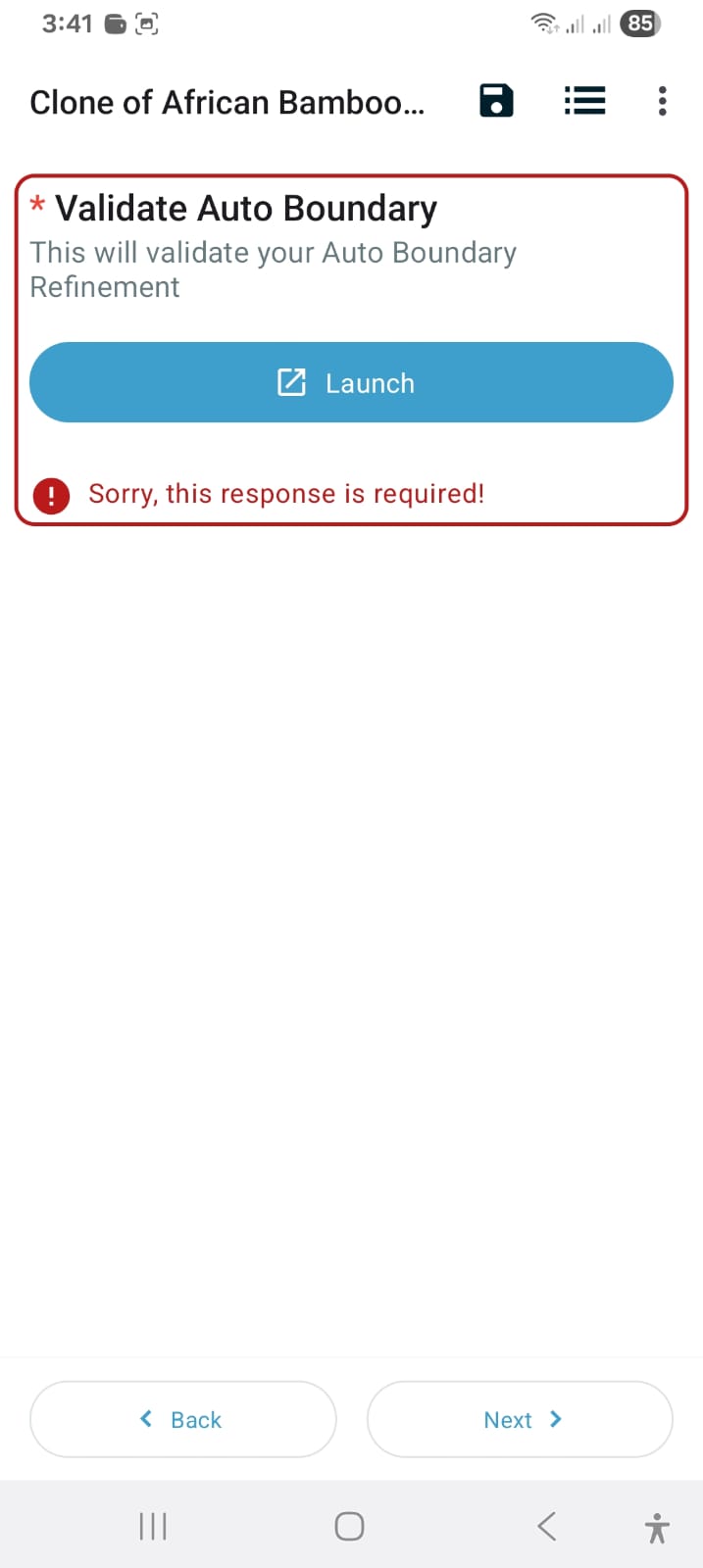
<table border="1" id="bkmrk-odk-external-validat" style="border-collapse: collapse; width: 100%;"><colgroup><col style="width: 38.2739%;"></col><col style="width: 61.8453%;"></col></colgroup><thead><tr><td>**ODK External Validation Screen**</td><td>**Description**</td></tr></thead><tbody><tr><td>[![Basic Plot validation_Error_validation_is_required.jpeg](https://wiki.cloud.akvo.org/uploads/images/gallery/2026-01/DnmI0k3eZJKIYqkl-basic-plot-validation-error-validation-is-required.jpeg)](https://wiki.cloud.akvo.org/uploads/images/gallery/2026-01/DnmI0k3eZJKIYqkl-basic-plot-validation-error-validation-is-required.jpeg)</td><td>**GV.1 - Required Field Error**

  
The validation field for the plot is mandatory. When the user presses the continue button without taking any action (such as pressing the launch button to record a plot), an error message will appear: *"Sorry, this response is required!"*

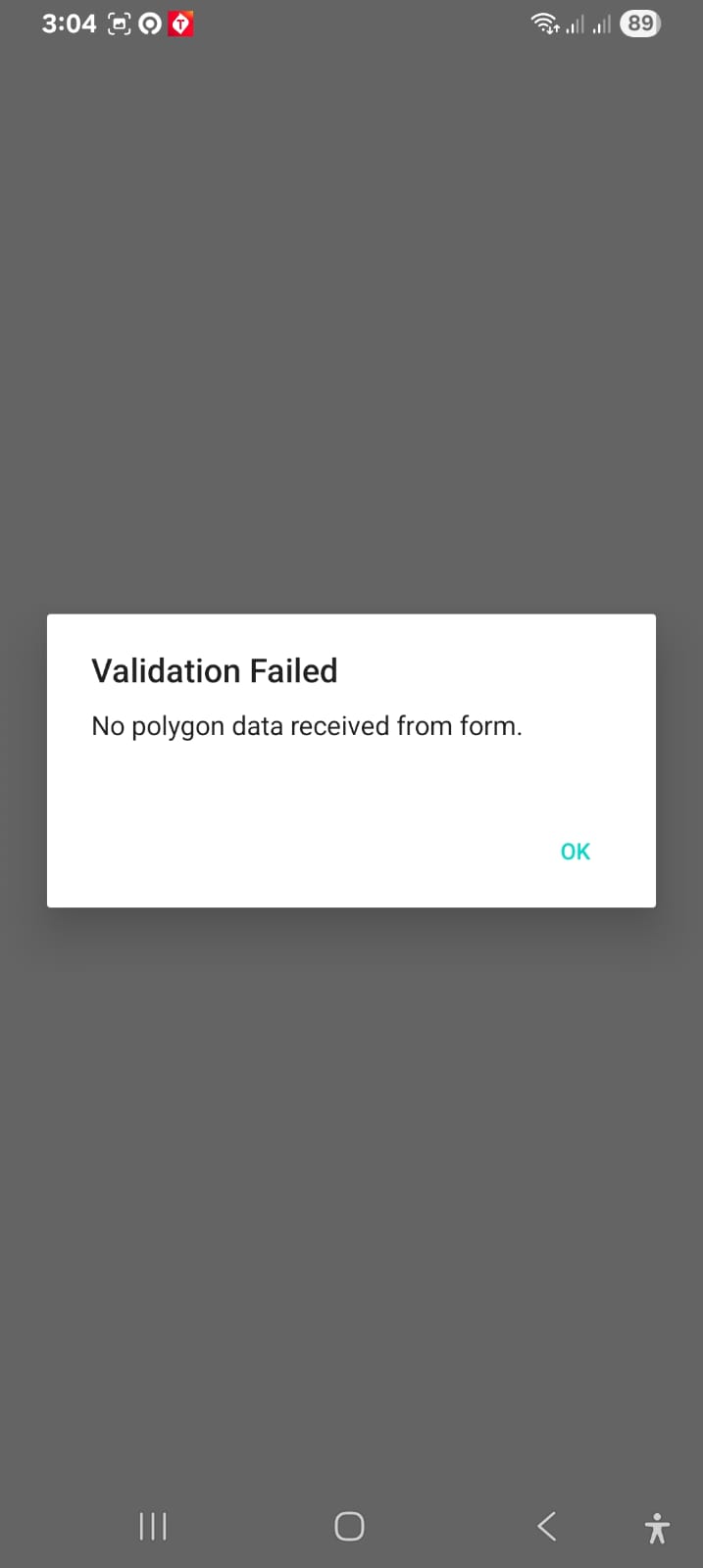
</td></tr><tr><td>[![WhatsApp Image 2026-01-28 at 3.38.24 PM (1).jpeg](https://wiki.cloud.akvo.org/uploads/images/gallery/2026-01/scaled-1680-/7flEPDfmMvPZIO9n-whatsapp-image-2026-01-28-at-3-38-24-pm-1.jpeg)](https://wiki.cloud.akvo.org/uploads/images/gallery/2026-01/7flEPDfmMvPZIO9n-whatsapp-image-2026-01-28-at-3-38-24-pm-1.jpeg)</td><td>**GV.2 - Empty or Null Plot Error**

This error message appears if:

- The recorded plot/boundary is empty, OR
- The polygon field is not set as mandatory and results in a null value

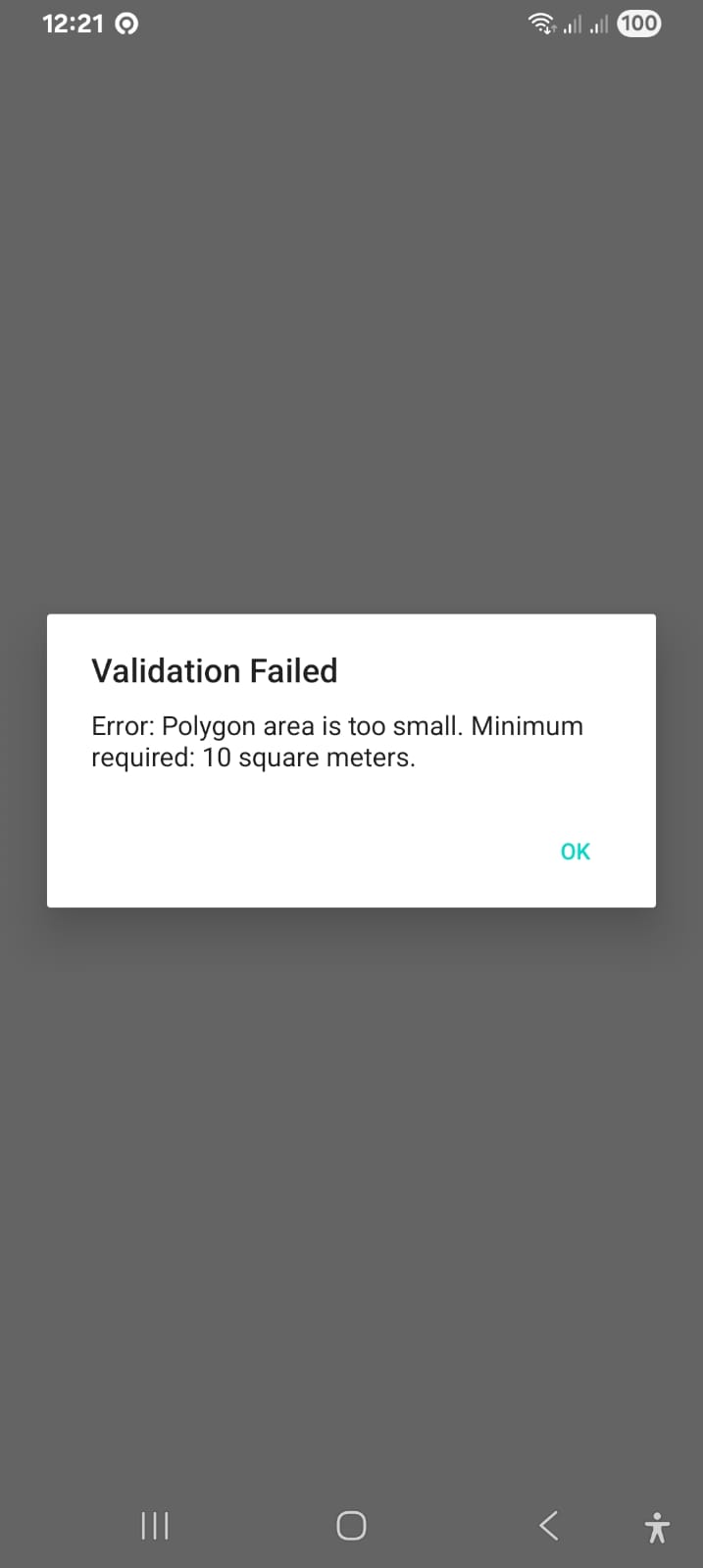
</td></tr><tr><td>[![Basic Plot validation_Error_Shape_too_small.jpeg](https://wiki.cloud.akvo.org/uploads/images/gallery/2026-01/scaled-1680-/1U8gDNIItouO4B6s-basic-plot-validation-error-shape-too-small.jpeg)](https://wiki.cloud.akvo.org/uploads/images/gallery/2026-01/1U8gDNIItouO4B6s-basic-plot-validation-error-shape-too-small.jpeg)</td><td>**GV.3 - Minimum Area Error**

  
This error message appears if the drawn/recorded plot is too small, with an area of less than **10 square meters**.

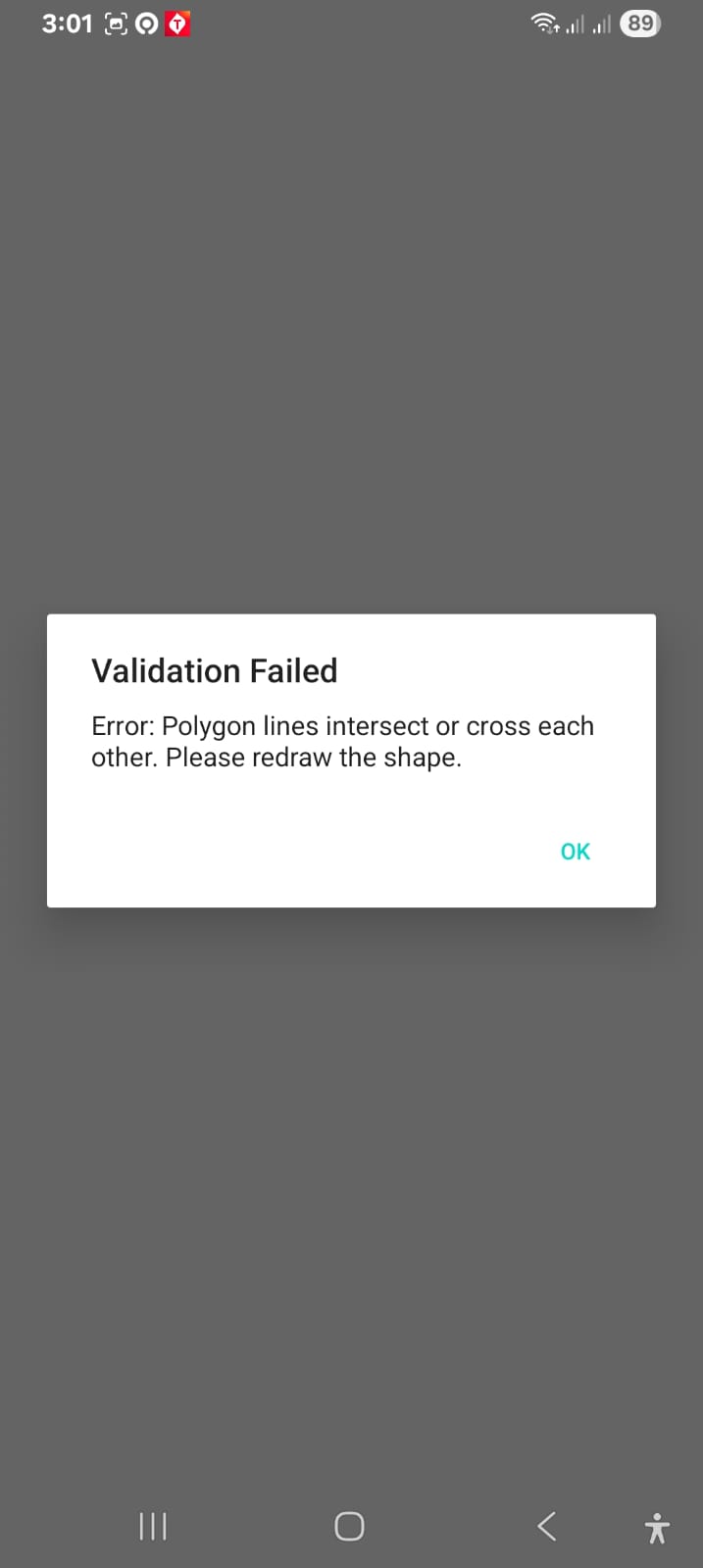
</td></tr><tr><td>[![Basic Plot validation_Error_Shape_line_intersect.jpeg](https://wiki.cloud.akvo.org/uploads/images/gallery/2026-01/scaled-1680-/1HvG1cASCCCE4J8s-basic-plot-validation-error-shape-line-intersect.jpeg)](https://wiki.cloud.akvo.org/uploads/images/gallery/2026-01/1HvG1cASCCCE4J8s-basic-plot-validation-error-shape-line-intersect.jpeg)</td><td>**GV.4 - Invalid Geometry Error**

  
This error message appears if the drawn/recorded plot/boundary has **overlapping lines** or self-intersecting geometry, which does not meet valid polygon criteria.

</td></tr><tr><td>[![Basic Plot validation_Error_Previous validation value is not match with current value.jpeg](https://wiki.cloud.akvo.org/uploads/images/gallery/2026-01/jlPVCTP9GFVpdEfA-basic-plot-validation-error-previous-validation-value-is-not-match-with-current-value.jpeg)](https://wiki.cloud.akvo.org/uploads/images/gallery/2026-01/jlPVCTP9GFVpdEfA-basic-plot-validation-error-previous-validation-value-is-not-match-with-current-value.jpeg)</td><td>**GV.5 - Re-validation Required Error**

  
This error message appears when:

- The user has already validated a valid plot/boundary
- They navigate back to a previous question to re-record the plot/boundary
- Validation needs to be performed again to ensure the plot remains valid

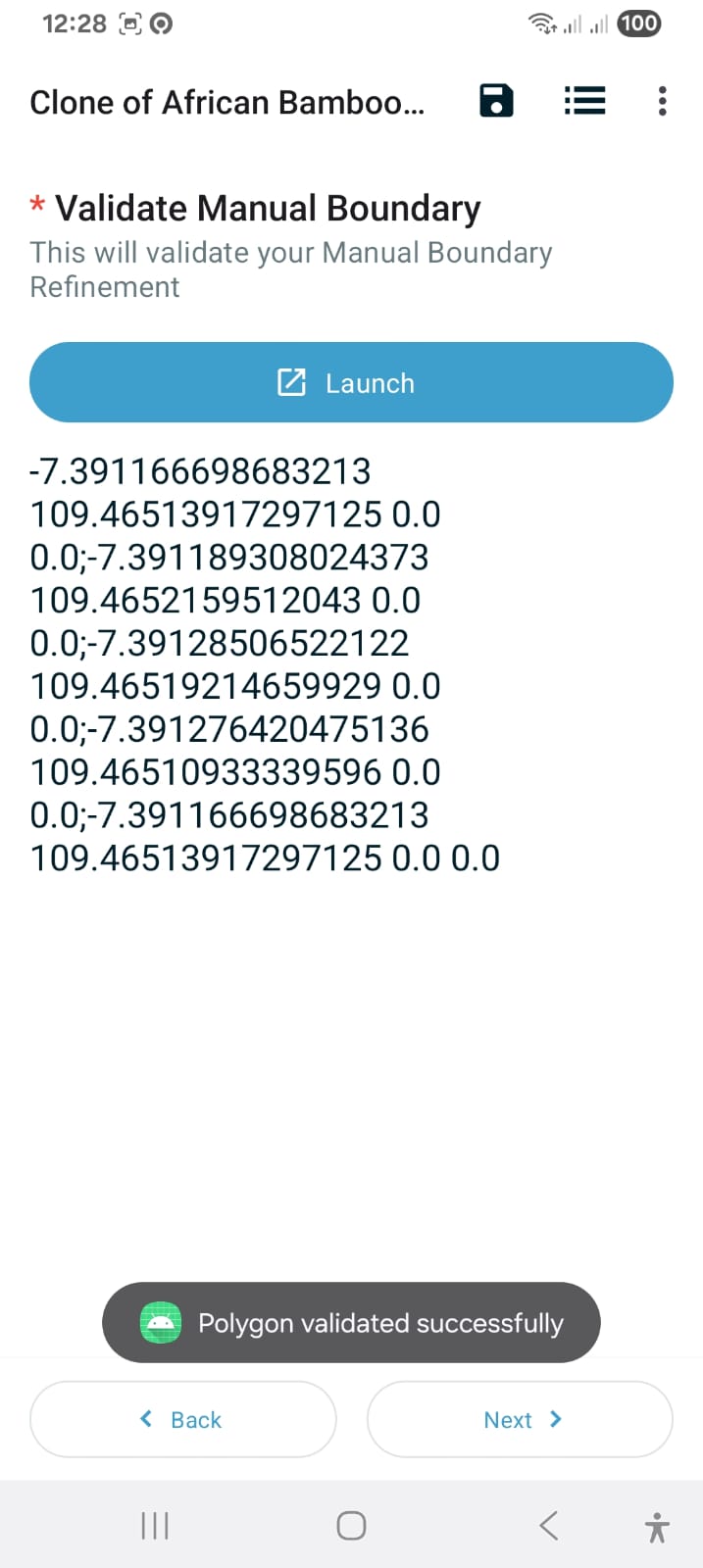
</td></tr><tr><td>[![Basic Plot validaton_Success.jpeg](https://wiki.cloud.akvo.org/uploads/images/gallery/2026-01/jxfffPeLpsnSjX4S-basic-plot-validaton-success.jpeg)](https://wiki.cloud.akvo.org/uploads/images/gallery/2026-01/jxfffPeLpsnSjX4S-basic-plot-validaton-success.jpeg)</td><td>**GV.6 - Successful Validation**

  
This is an example of a successful validation response. The plot/boundary value will be automatically copied to the validation field, preserving it for future reference (such as in the GV.5 re-validation scenario).

</td></tr></tbody></table>

## Application Development

### 1. Overview

The African Bamboo - ODK External Validations is an Android client for KoboToolbox API integration. It downloads form submissions, stores them locally, and supports incremental sync for offline access.

#### Implementation Progress

<table id="bkmrk-component-status-not"><thead><tr><th>Component</th><th>Status</th><th>Notes</th></tr></thead><tbody><tr><td>Authentication</td><td>✅ Complete</td><td>Encrypted storage with BasicAuth</td></tr><tr><td>API Integration</td><td>✅ Complete</td><td>Pagination, delta sync</td></tr><tr><td>Database</td><td>✅ Complete</td><td>Room with hybrid schema</td></tr><tr><td>All 6 Screens</td><td>✅ Complete</td><td>Jetpack Compose + Material 3</td></tr><tr><td>Navigation</td><td>✅ Complete</td><td>Type-safe routes</td></tr><tr><td>ViewModels</td><td>✅ Complete</td><td>StateFlow/MVVM</td></tr><tr><td>Geoshape Display</td><td>⏳ Planned</td><td>Map thumbnails not yet implemented</td></tr><tr><td>Testing</td><td>🔴 Minimal</td><td>Test skeletons only</td></tr></tbody></table>

---

### 2. API Integration

#### Endpoint

```
GET /api/v2/assets/{asset_uid}/data.json
```

##### Authentication

**Implementation:** `BasicAuthInterceptor.kt`

- Uses HTTP Basic Auth via OkHttp Interceptor
- Credentials stored in `EncryptedSharedPreferences`
- Dynamic base URL support for custom Kobo instances

##### Pagination

**Implementation:** `KoboRepository.kt`

- Page size: `limit=10`
- Cursor-based: follows `next` URL until null
- All pages inserted within single transaction

#### Delta Sync (Resync)

**Query Parameter:**

```
query={"_submission_time": {"$gte": "{last_sync_timestamp}"}}

```

- Timestamp format: ISO 8601 (UTC)
- Stored in `FormMetadataEntity.lastSyncTimestamp`

---

### 3. Data Model &amp; Database Schema

#### Architecture Decision: Hybrid Storage

Instead of form-specific columns, we use:

- **Typed columns** for system fields (`_uuid`, `submissionTime`, `submittedBy`)
- **JSON blob** (`rawData`) for all form answers

This enables support for any KoboToolbox form without schema changes.

#### Entity: `SubmissionEntity`

**File:** `data/entity/SubmissionEntity.kt`

<table id="bkmrk-field-type-source-de"><thead><tr><th>Field</th><th>Type</th><th>Source</th><th>Description</th></tr></thead><tbody><tr><td>`_uuid`</td><td>String (PK)</td><td>`_uuid`</td><td>Unique submission identifier</td></tr><tr><td>`assetUid`</td><td>String</td><td>Form ID</td><td>Links submission to form</td></tr><tr><td>`_id`</td><td>Int</td><td>`_id`</td><td>Kobo's internal ID</td></tr><tr><td>`submissionTime`</td><td>Long</td><td>`_submission_time`</td><td>Parsed ISO 8601 → timestamp</td></tr><tr><td>`submittedBy`</td><td>String?</td><td>`_submitted_by`</td><td>Username of submitter</td></tr><tr><td>`instanceName`</td><td>String?</td><td>`meta/instanceName`</td><td>Form instance name</td></tr><tr><td>`rawData`</td><td>String</td><td>Full JSON</td><td>Complete submission payload</td></tr><tr><td>`systemData`</td><td>String?</td><td>Extracted</td><td>Geolocation, tags, etc.</td></tr></tbody></table>

**Indices:** `assetUid`, `submissionTime`, `instanceName`, `_uuid`

#### Entity: `FormMetadataEntity`

**File:** `data/entity/FormMetadataEntity.kt`

<table id="bkmrk-field-type-descripti"><thead><tr><th>Field</th><th>Type</th><th>Description</th></tr></thead><tbody><tr><td>`assetUid`</td><td>String (PK)</td><td>Form identifier</td></tr><tr><td>`lastSyncTimestamp`</td><td>Long</td><td>Last successful sync time</td></tr></tbody></table>

#### DAOs

**SubmissionDao** (`data/dao/SubmissionDao.kt`)

- `insertAll()`, `insert()` - Bulk/single insert with REPLACE
- `getSubmissions(assetUid): Flow<List>` - Reactive list
- `getByUuid(uuid)` - Single submission lookup
- `getCount(assetUid)` - Total count
- `getLatestSubmissionTime(assetUid)` - For display
- `deleteByAssetUid()`, `deleteAll()` - Cleanup

**FormMetadataDao** (`data/dao/FormMetadataDao.kt`)

- `insertOrUpdate()` - Upsert pattern
- `getLastSyncTimestamp(assetUid)` - For delta sync

---

### 4. Screen Specifications

#### Screen 1: Login

**File:** `ui/screen/LoginScreen.kt` **ViewModel:** `LoginViewModel.kt`

<table id="bkmrk-element-implementati"><thead><tr><th>Element</th><th>Implementation</th></tr></thead><tbody><tr><td>Username field</td><td>Text input, required</td></tr><tr><td>Password field</td><td>Password input, obscured</td></tr><tr><td>Server URL</td><td>Text, default: `https://eu.kobotoolbox.org`</td></tr><tr><td>Form ID</td><td>Text, required</td></tr><tr><td>Submit button</td><td>"Download Data"</td></tr></tbody></table>

**Workflow:**

1. Validate all fields non-empty
2. Save credentials to `EncryptedSharedPreferences`
3. Navigate to Loading screen (DOWNLOAD type)

**Note:** Original spec called for `/token` endpoint. Implementation uses BasicAuth directly—no token exchange needed.

#### Screen 2: Download Loading

**File:** `ui/screen/LoadingScreen.kt` **ViewModel:** `LoadingViewModel.kt`

<table id="bkmrk-element-implementati-1"><thead><tr><th>Element</th><th>Implementation</th></tr></thead><tbody><tr><td>Spinner</td><td>CircularProgressIndicator</td></tr><tr><td>Message</td><td>"Downloading data..."</td></tr><tr><td>Error state</td><td>Retry + Back to Login buttons</td></tr></tbody></table>

**Logic:**

1. Construct URL: `{server_url}/api/v2/assets/{form_id}/data.json`
2. Fetch all pages (limit=10, follow `next`)
3. Transform JSON → `SubmissionEntity` list
4. Batch insert to Room
5. Store `lastSyncTimestamp`
6. Navigate to Download Complete with metrics

#### Screen 3: Download Complete

**File:** `ui/screen/DownloadCompleteScreen.kt`

<table id="bkmrk-element-implementati-2"><thead><tr><th>Element</th><th>Implementation</th></tr></thead><tbody><tr><td>Total entries</td><td>Passed via navigation args</td></tr><tr><td>Latest submission</td><td>Formatted date string</td></tr><tr><td>"View Data" button</td><td>Navigate to Home</td></tr><tr><td>"Resync Data" button</td><td>Navigate to Loading (RESYNC)</td></tr></tbody></table>

#### Screen 4: Home/Dashboard

**File:** `ui/screen/HomeDashboardScreen.kt` **ViewModel:** `HomeViewModel.kt`

<table id="bkmrk-element-implementati-3"><thead><tr><th>Element</th><th>Implementation</th></tr></thead><tbody><tr><td>Submission list</td><td>`LazyColumn` with `Flow<List>`</td></tr><tr><td>Search</td><td>TopAppBar search field</td></tr><tr><td>Sort</td><td>Bottom sheet (Name A-Z/Z-A, Date New/Old)</td></tr><tr><td>Resync FAB</td><td>Navigate to Loading (RESYNC)</td></tr><tr><td>Logout</td><td>Menu option with confirmation</td></tr><tr><td>Item click</td><td>Navigate to Submission Detail</td></tr></tbody></table>

**Geoshape Indicator:** ⏳ Not yet implemented. LLD specified map thumbnails or "Map Available" badge.

#### Screen 5: Resync Loading

**File:** `ui/screen/LoadingScreen.kt` (shared with Download)

<table id="bkmrk-element-implementati-4"><thead><tr><th>Element</th><th>Implementation</th></tr></thead><tbody><tr><td>Spinner</td><td>CircularProgressIndicator</td></tr><tr><td>Message</td><td>"Syncing data..."</td></tr></tbody></table>

**Delta Sync Logic:**

1. Get `lastSyncTimestamp` from `FormMetadataDao`
2. API call with `query` parameter (dates &gt;= timestamp)
3. Diff against local: 
    - **Added:** `_uuid` not in Room → Insert
    - **Updated:** `_uuid` exists AND remote `submissionTime` &gt; local → Update
4. Count added/updated records
5. Update `lastSyncTimestamp` to now
6. Navigate to Sync Complete with counts

#### Screen 6: Sync Complete

**File:** `ui/screen/SyncCompleteScreen.kt`

<table id="bkmrk-element-implementati-5"><thead><tr><th>Element</th><th>Implementation</th></tr></thead><tbody><tr><td>Added records</td><td>Count from sync</td></tr><tr><td>Updated records</td><td>Count from sync</td></tr><tr><td>Latest sync time</td><td>Current timestamp</td></tr><tr><td>"Return to Dashboard"</td><td>Navigate to Home</td></tr></tbody></table>

#### Screen 7: Submission Detail

**File:** `ui/screen/SubmissionDetailScreen.kt` **ViewModel:** `SubmissionDetailViewModel.kt`

<table id="bkmrk-element-implementati-6"><thead><tr><th>Element</th><th>Implementation</th></tr></thead><tbody><tr><td>Title</td><td>Instance name or formatted date</td></tr><tr><td>Submitted on</td><td>Formatted timestamp</td></tr><tr><td>Submitted by</td><td>Username</td></tr><tr><td>Answers list</td><td>Parsed from `rawData` JSON</td></tr></tbody></table>

**Answer Parsing:**

- Filters out system fields (prefix `_`, `meta`, `formhub`)
- Converts `snake_case` keys to `Title Case` labels
- Handles all JSON types (primitives, arrays, objects)

---

### 5. Navigation

**File:** `navigation/Routes.kt`, `navigation/AppNavHost.kt`

[![image.png](https://wiki.cloud.akvo.org/uploads/images/gallery/2026-01/scaled-1680-/oi0xYNga1CuTBRRB-image.png)](https://wiki.cloud.akvo.org/uploads/images/gallery/2026-01/oi0xYNga1CuTBRRB-image.png)

**Route Definitions:**

- `Login` - Entry point for logged-out users
- `Loading(type: LoadingType)` - DOWNLOAD or RESYNC
- `DownloadComplete(totalEntries, latestSubmissionDate)`
- `Home` - Entry point for logged-in users
- `SubmissionDetail(uuid)`
- `SyncComplete(addedRecords, updatedRecords, latestRecordTimestamp)`

---

### 6. Architecture

#### Pattern: MVVM + Clean Architecture

[![image.png](https://wiki.cloud.akvo.org/uploads/images/gallery/2026-01/lN1aO1xLkMFn6m0p-image.png)](https://wiki.cloud.akvo.org/uploads/images/gallery/2026-01/lN1aO1xLkMFn6m0p-image.png)

#### Dependency Injection

**Framework:** Hilt

<table id="bkmrk-module-provides-netw"><thead><tr><th>Module</th><th>Provides</th></tr></thead><tbody><tr><td>`NetworkModule`</td><td>`KoboApiService`, `OkHttpClient`, `Json`</td></tr><tr><td>`DatabaseModule`</td><td>`AppDatabase`, DAOs</td></tr></tbody></table>

#### State Management

- **ViewModels:** `StateFlow` for UI state
- **Database:** `Flow<List<T>>` for reactive lists
- **Collection:** `collectAsStateWithLifecycle()` in Composables

---

### 7. Security

#### Credential Storage

**File:** `data/session/SessionManager.kt`

- `EncryptedSharedPreferences` with AES256\_GCM
- `MasterKey` with AES256\_GCM scheme
- Stores: username, password, serverUrl, assetUid

#### Network Security

- BasicAuth over HTTPS only
- No token stored (credentials used per-request)
- Dynamic base URL validated before use

---

### 8. Definition of Done

<table id="bkmrk-requirement-status-e"><thead><tr><th>Requirement</th><th>Status</th><th>Evidence</th></tr></thead><tbody><tr><td>MVVM with StateFlow</td><td>✅</td><td>All 4 ViewModels use `MutableStateFlow`</td></tr><tr><td>Jetpack Compose UI</td><td>✅</td><td>All screens in `ui/screen/`</td></tr><tr><td>`collectAsStateWithLifecycle`</td><td>✅</td><td>Used in all screen Composables</td></tr><tr><td>Login + encrypted session</td><td>✅</td><td>`SessionManager` with AES256</td></tr><tr><td>Pagination (no missing records)</td><td>✅</td><td>`KoboRepository.fetchSubmissions()` follows `next`</td></tr><tr><td>Delta sync (Added vs Updated)</td><td>✅</td><td>`KoboRepository.resync()` with diffing</td></tr><tr><td>Offline access (Room cache)</td><td>✅</td><td>`SubmissionDao.getSubmissions()` returns cached data</td></tr><tr><td>Password/token encrypted</td><td>✅</td><td>`EncryptedSharedPreferences`</td></tr></tbody></table>

---

### 9. Known Gaps &amp; Future Work

### Not Yet Implemented

<table id="bkmrk-feature-priority-not"><thead><tr><th>Feature</th><th>Priority</th><th>Notes</th></tr></thead><tbody><tr><td>Geoshape map display</td><td>Medium</td><td>Show map thumbnail in list items</td></tr><tr><td>Geolocation validation</td><td>Low</td><td>External validation logic</td></tr><tr><td>Database migrations</td><td>High</td><td>Currently uses destructive migration</td></tr><tr><td>Comprehensive tests</td><td>High</td><td>Only skeleton files exist</td></tr><tr><td>Offline-first indicators</td><td>Low</td><td>No explicit offline mode UI</td></tr><tr><td>Error logging/Crashlytics</td><td>Medium</td><td>No crash reporting</td></tr></tbody></table>

#### Technical Debt

1. **Destructive migrations:** `fallbackToDestructiveMigration()` will lose data on schema changes
2. **Test coverage:** Minimal unit/instrumented tests
3. **Accessibility:** Limited `contentDescription` coverage

---

### 10. File Structure

```bash
app/src/main/java/com/akvo/externalodk/
├── data/
│   ├── dao/              # SubmissionDao, FormMetadataDao
│   ├── database/         # AppDatabase
│   ├── dto/              # KoboSubmissionDto, KoboDataResponse
│   ├── entity/           # SubmissionEntity, FormMetadataEntity
│   ├── network/          # KoboApiService, Interceptors
│   ├── repository/       # KoboRepository
│   └── session/          # SessionManager, AuthCredentials
├── di/                   # Hilt modules
├── navigation/           # Routes, AppNavHost
└── ui/
    ├── screen/           # All 6 Composable screens
    ├── theme/            # Material 3 theming
    └── viewmodel/        # Login, Loading, Home, SubmissionDetail

```

---

### Appendix: API Response Example

```json
{
  "count": 1250,
  "next": "https://kf.kobotoolbox.org/api/v2/assets/xxx/data.json?start=300",
  "previous": null,
  "results": [
    {
      "_id": 12345,
      "_uuid": "abc-123-def",
      "_submission_time": "2026-01-15T10:30:00Z",
      "_submitted_by": "field_worker",
      "meta/instanceName": "Survey 001",
      "question_1": "Answer 1",
      "question_2": 42,
      "geoshape": "..."
    }
  ]
}

```